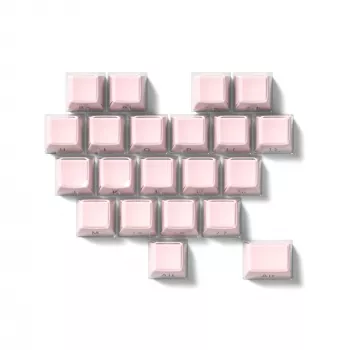
A heart-themed keycap set can turn a standard keyboard into a playful desk centerpiece with minimal effort. This 21-key set is designed for quick customization—ideal for accent keys, artisan-style clusters, or a full “cute” layout when paired with a matching base set. Below is a practical breakdown of what the set includes, how to check fit and compatibility, and tips for getting the best look and feel after installation.
Heart-shaped keycaps add dimension in a way that printed novelties can’t. The sculpted shape catches light, shows depth on camera, and gives your keyboard a “built” look even if you only change a few keys.
For a fast upgrade that still looks intentional, treat hearts like jewelry: pick focal points (Esc/Enter/arrows) and keep the rest of the board clean and consistent.
If you’re shopping for accents, the main goal is matching your keyboard’s physical standards (stem, sizes, profile) so the set looks great and installs smoothly.
| Item | Details |
|---|---|
| Product | 21-Key Heart-Shaped Keycap Set |
| Set size | 21 keys (accent kit) |
| Included keys | 21 novelty/accent keycaps |
| Price | $17.82 (USD) |
| Availability | In stock |
| Best for | Accent keys, themed clusters, gift builds, cute/pastel desk setups |
| Compatibility check | Confirm stem type (commonly MX-style), keycap profile, and key sizes needed for your layout |
Accent kits are easy upgrades—until a key doesn’t fit, sits too tall, or wobbles on a stabilized row. A quick compatibility check prevents most surprises.
Many mechanical keyboards use a cross-shaped “MX-style” stem, but not all do. If you’re unsure, compare your switch to a reputable reference like this Cherry MX switch overview before ordering.
Keycap sizes are usually listed in “u” units (1u, 1.25u, 1.5u, 2u, etc.). ISO and ANSI layouts differ most noticeably around Enter and some modifier keys, so measure the keys you plan to replace (or check your keyboard’s layout diagram) before committing.
Keycap profiles determine the height and sculpt of each row. Mixing profiles can look fun, but it may feel uneven during typing—especially on home-row or frequently used modifiers. If you want a consistent feel, match your main set’s profile; for a deliberate “novelty accent” feel, keep hearts on keys you don’t hit constantly.
For a deeper reference on common profiles, the Deskthority keycap profile guide is a solid overview.
Larger keys (Shift, Enter, Backspace, Spacebar) use stabilizers. Even if the keycap fits the switch stem, it must also align with your stabilizer style and mounting points to avoid binding, ticking, or a crooked return.
With 21 keys, the best results come from planning your “heart moments” so the board reads as themed rather than randomly swapped.
If you’re also upgrading the rest of your keycaps (materials, legends, long-term shine), browsing a keycap fundamentals overview like the WASD Keyboards blog can help you pick a base set that complements novelty accents.
A clean install protects your switches and stabilizers—and keeps the hearts sitting straight for the best visual effect.
For small adjustments during a keyboard refresh (case screws, stabilizer tweaks, tight spaces), an electronics tool kit can be handy. Consider pairing the keycap swap with the Electric Precision Screwdriver Set for Small Electronics if you’re already opening a board for tuning.
Fit depends on the switch stem type, keycap profile, and the specific key sizes you plan to replace (often listed in “u” units). Confirm your keyboard’s switch stem (commonly MX-style on many custom boards) and verify the included key sizes match your layout.
Yes, but the height and row shape can feel uneven. If you want the most comfortable result, use accents on keys you don’t press constantly (like Esc or arrows) or choose accents that match your main set’s profile.
They can, as long as the keycap supports your keyboard’s stabilizer configuration and mounts cleanly. Install stabilized keys carefully and re-seat them if you notice binding, crooked travel, or new rattles.










Leave a comment