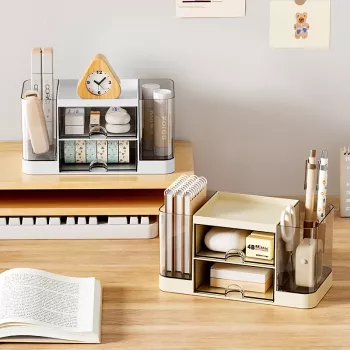
A compact desk can still hold everything needed for class or work when small essentials have a dedicated home. A 2-drawer desktop organizer keeps pens, sticky notes, clips, chargers, and small tools separated and easy to reach, while reducing surface clutter for a cleaner, more focused setup. The goal isn’t to store more—it’s to stop the daily shuffle of “where did that go?” and make it simple to reset your space in minutes.
The best organizers act like a small “map” of your day. Instead of one catch-all cup, a two-drawer setup gives you three distinct zones: the top surface and two enclosed drawers. That’s enough separation to keep tiny items from wandering while still staying quick to use.
| Item | Best spot | Why it works |
|---|---|---|
| Everyday pen + highlighter | Top surface | Fast access without opening drawers |
| Sticky notes + index tabs | Upper drawer | Protected from curling and dust |
| Paper clips + staples | Upper drawer (small cup/divider) | Prevents scattering and loss |
| Tape + correction tools | Lower drawer | Fits bulkier shapes without snagging |
| Chargers + adapters | Lower drawer | Keeps cables contained and off the desk |
A small organizer earns its keep when a desk has to do multiple jobs—study, work, and personal admin—without expanding into a full drawer cabinet.
A desktop organizer works best when it’s paired with a quick, repeatable setup. This approach keeps the drawers useful instead of turning into a “miscellaneous” trap.
Clutter isn’t only visual—it can affect how comfortably you use your desk. Basic workstation guidance emphasizes keeping frequently used items within easy reach and maintaining a setup that supports neutral posture. For deeper ergonomics references, see OSHA’s Computer Workstations eTool and Cornell University’s office ergonomics resources.
| Option | Best for | Tradeoffs |
|---|---|---|
| Pen cup | Pens/markers only | Small items still scatter |
| Open desk tray | Mail and papers | Harder to contain tiny supplies |
| Large drawer unit | High volume storage | Takes space; can encourage overfilling |
| 2-drawer desktop organizer | Daily essentials + small accessories | Limited capacity for large tools |
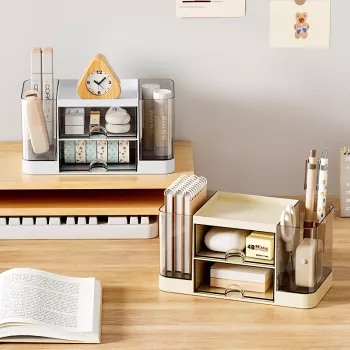
If the goal is a tidy, repeatable setup for everyday supplies, the 2-Drawer Pen Organizer – Multi-Functional Desktop Storage Box for Students & Office is a practical fit. Two drawers help separate small items by category, while the top surface stays ready for the tools you reach for constantly. It’s especially useful on minimal desks where every inch of surface space matters.
Stationery clutter is only half the battle—papers can take over a desk quickly. A folder system keeps assignments, bills, and reference sheets upright and sorted, so the desktop stays clear for active work. The 10PCS A4 Hanging File Folder – Colorful Portable Document Organizer pairs well with a small drawer organizer by splitting “tools” from “paper” storage.
Keep the most frequently used tools on the top surface for instant access. Use the upper drawer for small daily supplies like sticky notes and clips, and reserve the lower drawer for bulkier items such as tape, chargers, or marker packs.
Assign each drawer a clear category and keep tiny items in a small cup or divider so they don’t mix. A quick weekly reset—return items to zones and remove duplicates—prevents slow clutter creep.
For daily stationery and small accessories, it’s usually enough. Pair it with a simple document system (folders or a file holder) for papers and handouts to avoid stacking piles on the desktop.












Leave a comment