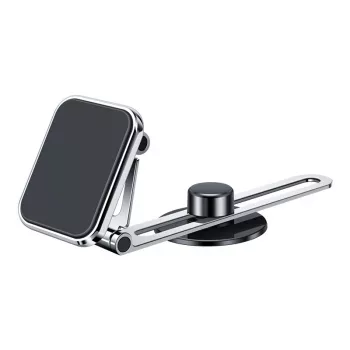
A well-placed phone mount keeps navigation and calls visible without blocking the road. This magnetic mount pairs a telescopic arm for reach with 360° rotation for quick angle changes, making it easy to position a phone where it’s comfortable to glance at—whether the mount sits on the dash or windshield. The goal is simple: a steady, readable screen that stays put through turns, braking, and rougher pavement, without turning mounting and unmounting into a two-handed chore.
Most mounts focus on just one advantage—either quick attachment or flexible positioning. This design combines both, so the mount feels “set and forget” once you dial in the placement, while still letting you pop the phone on and off in seconds.
A mount earns its place when it improves routine driving without demanding extra attention. The telescopic arm helps you bring the display forward when needed, while rotation helps you match the angle to whatever you’re doing.
Adjustability is what separates “good enough” from “actually comfortable.” With a telescopic arm, the phone doesn’t have to live far back on the dash where you end up leaning forward to tap. With 360° rotation, you can correct glare and align the screen to your seated posture—without re-installing the base.
| Placement | Why it helps | Tip |
|---|---|---|
| Dashboard (center) | Keeps the display close to the driver’s natural sightline | Avoid blocking vents or hazard controls |
| Windshield (lower corner) | Good for vehicles with limited flat dash space | Keep it low enough to avoid obstructing road view |
| Slightly angled toward driver | Reduces glare and improves readability | Rotate to align with your seated posture |
| Extended toward driver | Easier taps when parked or using large on-screen buttons | Don’t extend so far that it interferes with steering or airbags |
Magnetic mounting is all about speed and repeatability. Instead of squeezing side clamps or aligning tabs, you guide the phone toward the mount and it “finds” the right spot. For best results, the phone needs a compatible metal plate or magnetic ring applied to the case or device.
If you notice micro-shake on choppy roads, shorten the telescopic arm slightly and re-angle the head. Reducing leverage usually makes the biggest difference in stability.
Good installation is less about tools and more about choosing the right spot and preparing the surface. A few minutes here can prevent slow sagging, sudden slips, or a mount that never feels quite “tight.”
For safety guidance on keeping attention on the road, review the National Highway Traffic Safety Administration’s overview of distracted driving.
For iPhone users and magnetic accessories, Apple’s guidance on the magnets inside iPhone is a helpful reference point when pairing cases, wallets, and mounts.
If quick magnetic docking and flexible positioning are the priorities, Magnetic Car Phone Mount with Telescopic Arm and 360° Rotation keeps the setup simple while offering the reach and angle control that many basic mounts lack.
Modern smartphones are designed to handle everyday magnetic exposure, and GPS performance is typically unaffected. In some cases, the phone’s compass can need recalibration after exposure to magnets—if navigation seems off, recalibrating the compass in your maps app usually resolves it.
Yes, when the metal plate or ring is centered and firmly attached, and the mount base is installed on a clean surface. For rough roads, keeping the telescopic arm less extended reduces leverage and helps minimize wobble.
Avoid mounting in airbag deployment zones (commonly the steering wheel, passenger dash area, and certain pillar locations depending on the vehicle). Keep the phone out of the driver’s forward view and check the vehicle manual for airbag coverage so placement stays clear of those areas.












Leave a comment