
A reliable wireless microphone system keeps speech and vocals clear while letting the presenter, performer, or instructor move freely. Instead of running long mic cables across a room, the microphone’s signal is sent through the air to a receiver that feeds a PA speaker, mixer, camera, or recorder. The result is faster setups, fewer trip hazards, and more confident movement on stage, in a classroom, or on a livestream.
A wireless microphone system transmits audio from a microphone to a receiver using radio frequency (RF) or, in some models, a digital 2.4 GHz connection. The receiver then outputs the signal to whatever is amplifying or recording the sound—often a powered speaker, mixing console, camera input, or audio interface.
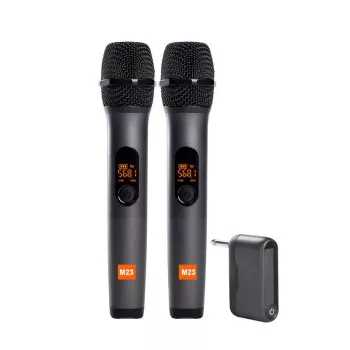
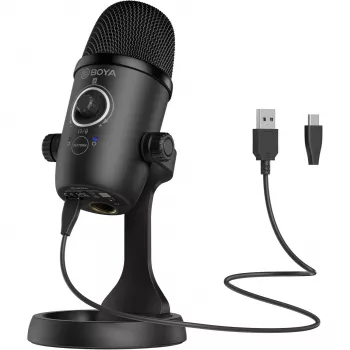
Most systems include a microphone (handheld or a lavalier/headset), a transmitter (either built into the handheld mic or as a bodypack), a receiver, power or charging accessories, and at least one output cable. Because the receiver is the “bridge” to the rest of the sound chain, its outputs (3.5 mm, 1/4 in, or XLR) and the destination device’s input type should match—or be adapted correctly.
Choosing the mic style is often the biggest “real-world” decision, since it affects consistency, room noise, and how naturally someone can present.
Handheld wireless mics excel for speeches, interviews, announcements, and karaoke because the capsule can stay close to the mouth. That strong direct signal typically means better clarity and less room echo than a mic placed farther away.
Lavalier systems are popular for instructors, presenters, and streamers who need hands-free speaking. Placement and clothing noise control matter a lot—small adjustments can be the difference between clean speech and distracting rustle.
Headset mics can provide the most consistent level for fitness classes, theater, and high-energy speaking, because the mic stays at a fixed distance from the mouth even while moving.
If two people need microphones at once, a dual-channel receiver reduces gear and speeds up setup—one receiver, two transmitters, and fewer cables to the mixer or speaker.
| Type | Best for | Main trade-off |
|---|---|---|
| Handheld | Speeches, interviews, karaoke | Less hands-free; handling noise if gripped tightly |
| Lavalier | Teaching, presentations, streaming | Can pick up clothing rub; needs careful placement |
| Headset | Fitness, theater, high-movement talk | More visible; fit/comfort varies by user |
Many modern systems use the 2.4 GHz band for convenient, license-free operation in many regions. UHF systems can deliver excellent results too, but may require frequency planning to avoid TV channels and other nearby users. For U.S. guidance, review the FCC wireless microphone resources.
Wireless range depends heavily on what’s between the transmitter and receiver. Walls, people, metal truss, and racks can all weaken a signal. A practical habit: keep the receiver’s antennas unobstructed and, when possible, elevated rather than buried behind speakers or inside a cabinet.
Low latency matters for live monitoring and video. Excess delay can feel unnatural in in-ear monitors and can complicate lip-sync in recorded content.
Wi‑Fi routers, Bluetooth devices, LED walls, and certain power supplies can increase noise or reduce stability. If you’re in a congested environment, reduce Wi‑Fi load where possible and keep the receiver away from dense cable bundles and power bricks. For frequency-planning help with UHF systems, tools like the Shure Frequency Finder can be useful.
For presentations, small events, and casual streaming, a straightforward system that’s easy to connect and quick to set up is often the best choice. A dependable option to keep on hand is the Wireless Microphone System, which fits common use cases where clear voice pickup and cable-free mobility are the main goals.
To make setups smoother, keep a small “show kit” nearby with spare batteries or a charging cable, a couple of short adapter cables, and an extra windscreen. For organizers managing multiple speakers or sessions, having a simple way to sort schedules, consent forms, and run-of-show notes helps—consider the 10PCS A4 Hanging File Folder – Colorful Portable Document Organizer as an easy grab-and-go solution.
| Item | Price | Availability |
|---|---|---|
| Wireless Microphone System | $46.82 | In stock |
| 10PCS A4 Hanging File Folder – Colorful Portable Document Organizer | $24.97 | In stock |
Reliable range depends on the frequency band, transmitter power, receiver placement, obstacles, and local interference. For best results, test with line-of-sight when possible and keep the receiver elevated with antennas unobstructed.
Cutouts are usually caused by RF interference, weak batteries, blocked antennas, too much distance, or crowded nearby Wi‑Fi. Switching channels, repositioning the receiver, and doing a walk test before the session typically resolves the issue.
It depends on the receiver’s output and your device’s input type. Many setups work with a 3.5 mm connection, while phones may require TRRS, USB‑C, or Lightning adapters; set input levels carefully to avoid clipping.









Leave a comment